


Overview
AI has progressively changed how I design at Jolimoi, but not by replacing Figma or the design process.
It started with a more traditional Design System in Figma. As AI design tools became more capable, I progressively made those foundations usable across Claude Code and Claude Design, allowing me to explore ideas faster, prototype with real product context, and in some cases move directly from design to engineering.
Today, I choose the tool based on the need: Figma for complex flows and detailed interaction design, Claude Design when I want to explore directions, prototype and iterate quickly, and Lovable when the work benefits from going beyond design into a functional product experience.
The goal is not to use AI everywhere. It is to reduce the distance between an idea and a product experience without losing design consistency or product judgment.
Building the foundation in Figma
Before introducing AI into my workflow, I started by structuring Jolimoi's design foundations in Figma.
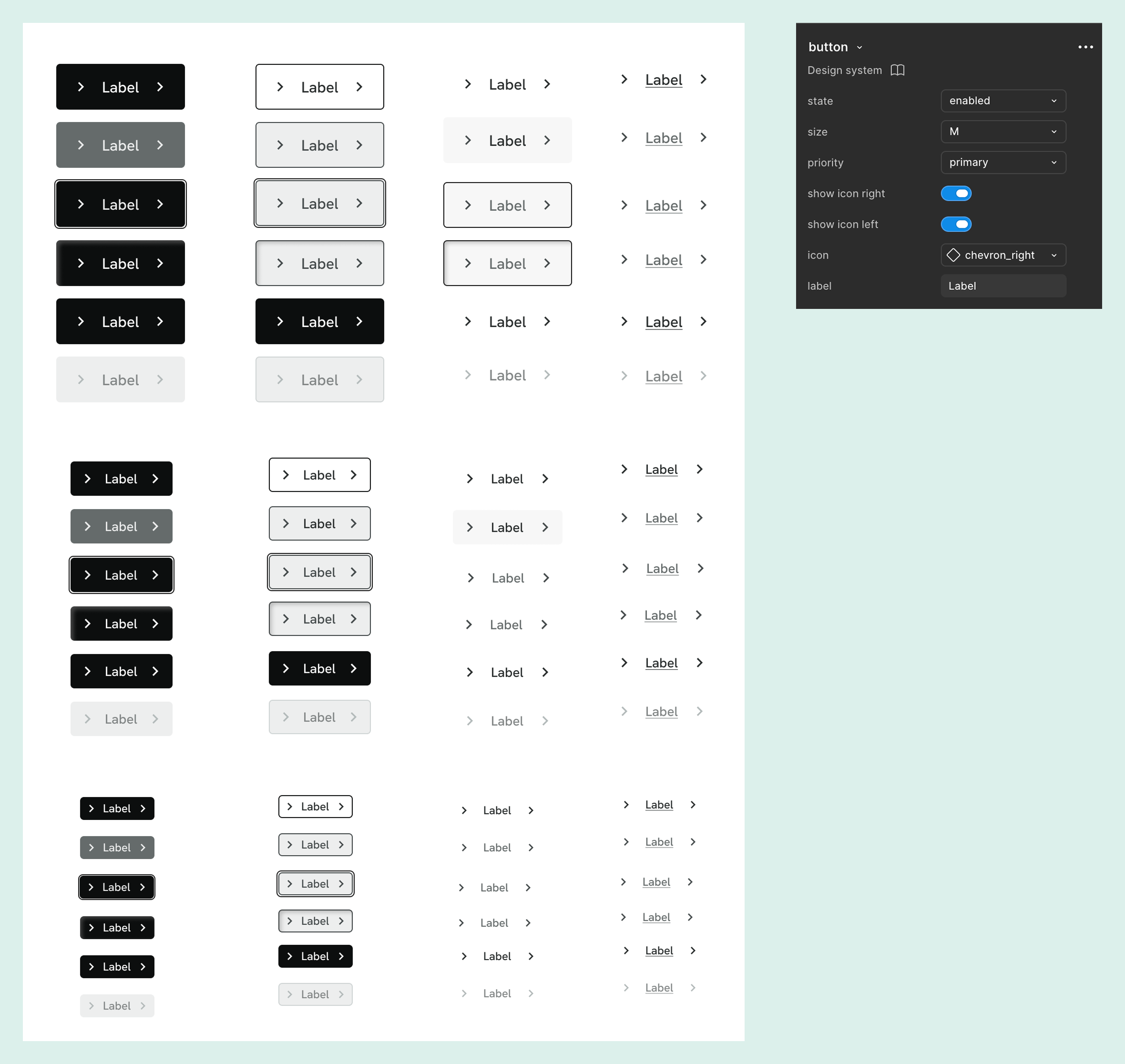
I created variables based on our visual language, including colors and typography, and progressively built reusable components and patterns for the e-shop and the Business App.
The objective was not only visual consistency. I wanted a shared foundation that could evolve with the product and make design decisions reusable rather than recreated feature by feature.
Figma remains an important part of my workflow today, particularly for complex user journeys, longer flows and situations where I need to explore interactions across multiple screens.
Giving AI our product context
Generic AI output was not useful enough for product work. For it to become part of my workflow, it needed to understand how Jolimoi actually designs.
Using Figma MCP with Claude Code, I extracted design variables from Figma and started documenting the system in a format Claude could use.
I created a Product Design Partner skill, later shared internally, containing design tokens, UX writing principles, component documentation, usage rules and do & don'ts.
This created a reusable layer of product context around the Design System.
Instead of repeatedly explaining what a Jolimoi interface should look and sound like, I could give Claude access to the same foundations I was already using as a designer.
The goal wasn't to make AI generate more UI. It was to give it enough context to generate relevant UI.
Bringing the system into Claude Design
When Claude Design became available, my workflow evolved again.
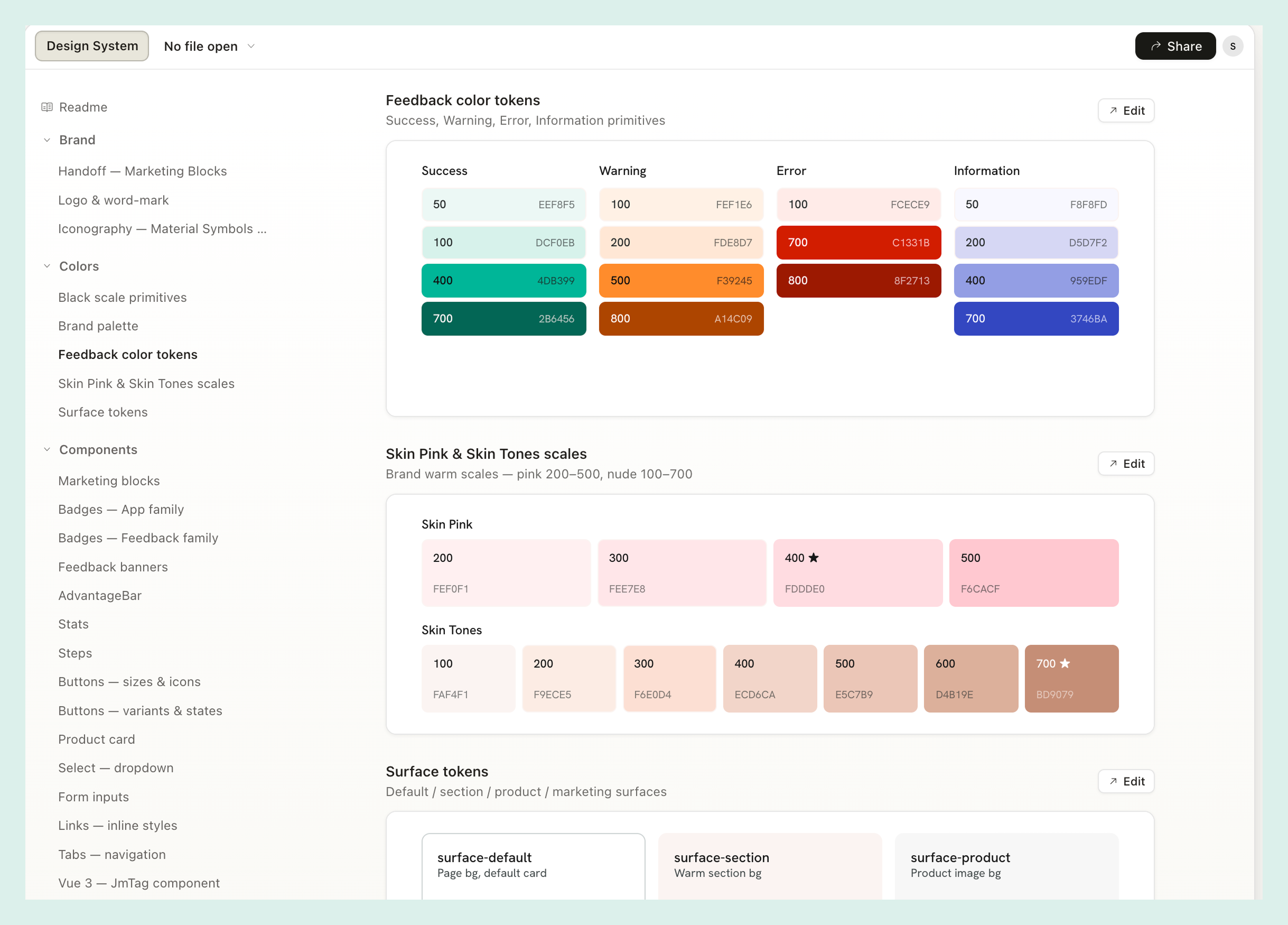
I brought the existing foundations into Claude Design using component references from Figma, screenshots, and the Product Design Partner documentation I had built in Claude Code.
The skill documented our design tokens, UX writing principles, component behavior and do & don'ts, giving Claude the context needed to generate interfaces closer to Jolimoi's existing product.
I then refined components directly in Claude Design, added missing patterns, and iterated on them while keeping the Claude and Figma foundations aligned.
I built a workflow to keep the same design foundations consistent across Figma, Claude Code and Claude Design, while adapting the process as the tools evolved.
Claude Design
Choosing the right tool
Introducing Claude Design did not mean moving every project out of Figma. Instead, it changed how I choose the level of fidelity and tooling a problem actually needs.
For complex journeys involving many screens, states and dependencies, I still work primarily in Figma.
For smaller features, early exploration or problems where I want to compare several directions quickly, I increasingly use Claude Design. It lets me generate starting points, challenge an initial direction and iterate directly on functional prototypes.
Sometimes I then recreate or extend the selected direction in Figma. Sometimes I don't need to.
AI became another design environment, not a replacement for the design process.
From Claude Design to Engineering
One project showed me that Claude Design could go beyond exploration.
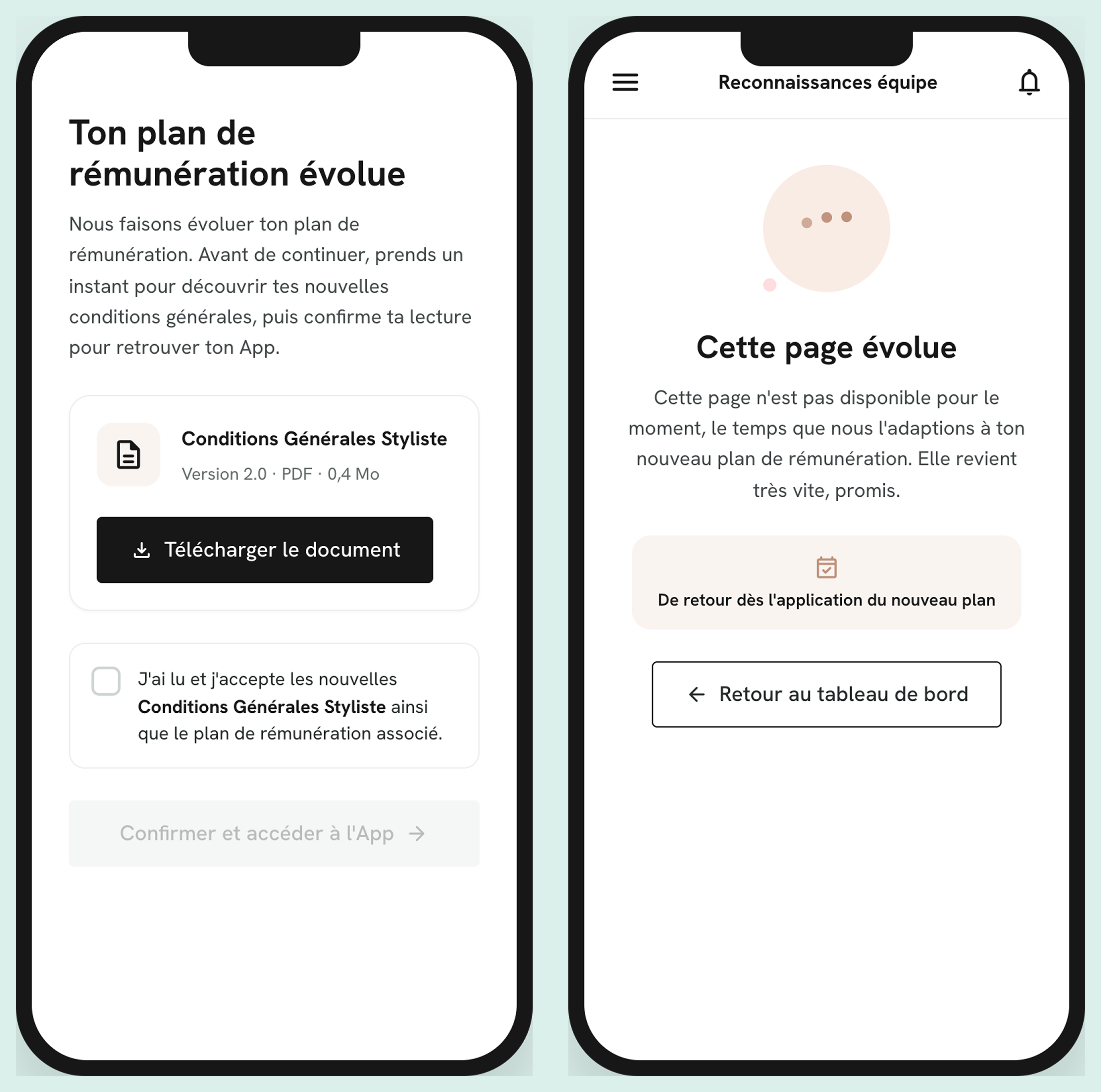
Jolimoi was introducing a new remuneration plan. During the transition, some existing areas of the Business App, including progression and team performance, needed to become temporarily unavailable.
At the same time, Stylists needed to review and accept the new terms before being allowed to access the App again.
I designed both experiences directly in Claude Design using the existing product foundations: the temporary unavailable states and the mandatory acceptance journey.
Because the resulting interfaces used the same product foundations and were already at implementation-level fidelity, I did not recreate them in Figma. I shared the final Claude Design prototype directly with Engineering as the design handoff.
This was an important evolution in my workflow: for the right type of feature, exploration, UI design, prototyping and handoff could happen in the same environment.
It also surfaced a new challenge: traceability. As design work starts to live across Figma, Claude Design and code, the team needs a clear way to know where the latest source lives and how to retrieve past decisions. My next step is therefore not to move everything away from Figma, but to define a lightweight system for documenting and linking AI-produced work alongside the rest of our product documentation.
Direct handoff
Going further with Lovable
From an initial idea board to a product feedback loop
I also explored what happens when AI-assisted design goes beyond prototyping and becomes part of the product itself.
My manager initiated Jolimoi User Voice in Lovable as a way to centralize improvement ideas from Stylists directly inside the Business App. I then took over the project and led its product and design evolution.
I aligned the interface with Jolimoi's Design System and expanded the initial concept into a more complete feedback system.
Stylists can submit ideas, vote, comment and follow their contributions. The experience also handles cases such as duplicate suggestions, attachments, search and filtering, mentions, statuses and official Jolimoi responses.
On the internal side, I developed the experience into an operational tool for the teams, with an admin environment for reviewing and moderating suggestions, organizing feedback, tracking activity and responding to the community.
User voice
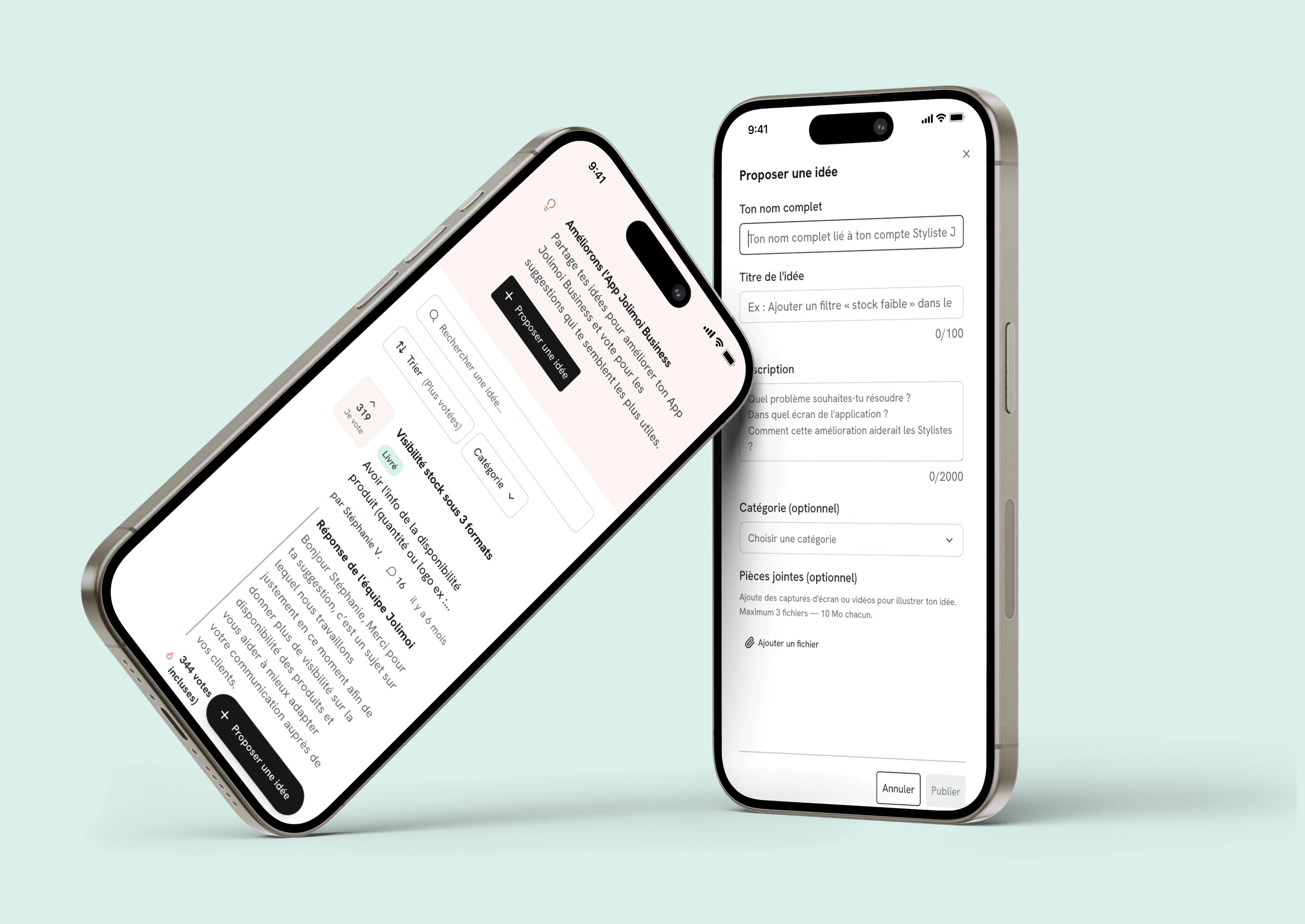
Designing both sides of the feedback loop
The challenge was not only designing how a Stylist submits an idea. For the system to be useful, I also had to think about what happens after submission.
How do teams distinguish recurring requests? How are ideas categorized? How do we communicate that something is being considered or delivered? How do we handle moderation? How do internal teams turn hundreds of individual contributions into something actionable?
The admin experience therefore became as important as the Stylist-facing experience.
The experience is embedded directly into the Jolimoi Business App through an iframe, making feedback collection part of the existing product rather than a separate external tool.
Connecting user feedback back to Product
User Voice is not only a place to collect feedback. Ideas, comments and votes give the Product team another source for identifying recurring needs and understanding what matters to Stylists.
Relevant requests are added to our backlog and used when prioritizing future work. When we start working on a larger initiative, we return to the feedback already collected around that topic and bring those needs directly into discovery.
This creates a continuous loop:
Stylist feedback → signals & patterns → Product backlog → discovery & prioritization → product improvements
Instead of feedback disappearing into individual conversations or channels, it becomes information the Product team can return to and act on.
What changed in my workflow
The biggest change is that the boundary between designing, prototyping and building has become less rigid.
Depending on the problem, I can now move between different levels of execution:
- Explore
- Use AI to challenge an idea and generate alternative directions.
- Design
- Work with real Design System foundations in Figma or Claude Design.
- Prototype
- Create interactive experiences earlier and iterate faster.
- Handoff
- For some contained features, share Claude Design directly with Engineering.
- Build
- For the right use case, contribute to a functional product through tools such as Lovable.
The designer's responsibility remains the same throughout: understand the problem, make the right decisions, handle complexity and ensure that what gets built works for users and for the product.
What's next
The workflow is still evolving. A few months ago, much of my AI-assisted design work relied on markdown documentation and generated specifications. Today, I can work directly in Claude Design, prototype functional experiences faster and, in some cases, contribute to working products through tools like Lovable.
I don't expect the tools I use today to remain the same. What matters to me is understanding where new tools genuinely improve the design process and adapting my workflow as their capabilities evolve.
As design work starts to live across Figma, Claude Design and AI-assisted building tools, traceability and maintainability become increasingly important.
I am currently exploring a closer connection between the Design System, GitHub and Storybook to improve visibility into implemented components, while defining a lightweight way to document where each feature was designed and where its latest implementation lives.
This has become particularly relevant as the team no longer has a dedicated Front-end Developer. It gives me an opportunity to contribute closer to implementation while Engineering maintains its own development conventions and AI-assisted coding workflow.
The goal isn't to force every project into the same tool. It's to make sure the system remains understandable and maintainable for the next designer or engineer who works on it.